Understanding Embedded AI and Its Applications
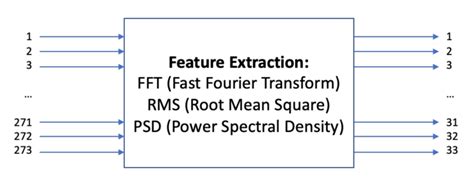
Embedded AI refers to the integration of artificial intelligence capabilities into embedded systems, enabling devices to perform intelligent tasks without relying on cloud-based processing. This approach offers several advantages, including reduced latency, enhanced privacy, and the ability to operate in environments with limited or no internet connectivity.
Embedded AI finds applications across various domains, such as:
- IoT (Internet of Things) devices
- Autonomous vehicles
- Smart homes and cities
- Industrial automation
- Healthcare monitoring and diagnostics
By leveraging the power of machine learning algorithms and specialized hardware, Embedded AI systems can process data in real-time, make decisions, and adapt to changing conditions, leading to more efficient and intelligent solutions.
The Challenges of Designing Embedded AI PCBs
Designing PCBs for Embedded AI systems presents unique challenges compared to traditional PCB design. Some of the key considerations include:
-
Processing Power: Embedded AI applications often require high-performance processors, such as GPUs (Graphics Processing Units) or AI accelerators, to handle the intensive computations involved in machine learning algorithms.
-
Memory and Storage: AI models and datasets can be large, necessitating ample memory and storage capacity on the PCB.
-
Power Efficiency: As Embedded AI devices are often battery-powered or have limited power budgets, optimizing power consumption is crucial to ensure long operating times and minimal heat generation.
-
Connectivity: Embedded AI systems may require various connectivity options, such as Wi-Fi, Bluetooth, or cellular, to communicate with other devices or cloud services.
-
Form Factor: Embedded AI PCBs need to be compact and lightweight to fit into the intended device, while still accommodating all the necessary components and features.
Addressing these challenges requires careful planning, component selection, and design optimization, which is where tools like Coral, Google, and Upverter come into play.

Coral: Accelerating Embedded AI Development
Coral is a platform developed by Google that provides a range of hardware and software tools to simplify the development of Embedded AI solutions. The platform offers two main components:
-
Coral Edge TPU: The Tensor Processing Unit (TPU) is a custom-designed ASIC (Application-Specific Integrated Circuit) that accelerates machine learning inferencing. It is optimized for running TensorFlow Lite models and offers high performance with low power consumption.
-
Coral Software Tools: Google provides a suite of software tools, including the Edge TPU Compiler, TensorFlow Lite, and the Coral Python API, to facilitate the development, deployment, and optimization of AI models on the Edge TPU.
By leveraging Coral’s hardware and software ecosystem, designers can quickly prototype and deploy Embedded AI solutions without the need for extensive expertise in AI or embedded systems.

Google’s TensorFlow Lite: Enabling Efficient On-Device Inference
TensorFlow Lite is an open-source deep learning framework designed specifically for on-device inference. It allows developers to compress and optimize machine learning models to run efficiently on resource-constrained devices, such as microcontrollers and embedded systems.
TensorFlow Lite offers several key features:
-
Model Optimization: The framework provides tools to quantize, prune, and compress models, reducing their size and computational requirements without significant accuracy loss.
-
Diverse Platform Support: TensorFlow Lite can run on various hardware platforms, including CPUs, GPUs, and specialized AI accelerators like the Coral Edge TPU.
-
Pre-trained Models: Google offers a wide range of pre-trained models for common AI tasks, such as image classification, object detection, and natural language processing, which can be easily integrated into Embedded AI applications.
-
Extensive Documentation and Community Support: TensorFlow Lite benefits from comprehensive documentation, tutorials, and an active community of developers, making it easier for designers to get started and find support when needed.
By combining TensorFlow Lite with the Coral Edge TPU, designers can create efficient and high-performance Embedded AI solutions that run seamlessly on resource-constrained devices.
Upverter: Streamlining PCB Design for Embedded AI
Upverter is a cloud-based PCB design platform that simplifies the process of creating and collaborating on PCB designs. It offers a user-friendly interface, extensive component libraries, and powerful design automation tools, making it an ideal choice for Embedded AI PCB design.
Some of the key features of Upverter include:
-
Schematic Capture: Upverter provides an intuitive schematic editor that allows designers to quickly create and modify circuit diagrams, with real-time design rule checks and automatic error detection.
-
PCB Layout: The platform offers a powerful PCB layout editor with advanced routing capabilities, 3D visualization, and real-time design rule checking to ensure manufacturability and reliability.
-
Component Libraries: Upverter integrates with extensive component libraries, including the Coral Edge TPU and various AI-specific components, making it easy to find and incorporate the right parts into the design.
-
Collaboration and Version Control: The cloud-based nature of Upverter enables seamless collaboration among team members, with real-time updates, version control, and the ability to share and review designs easily.
-
Manufacturing Support: Upverter partners with leading PCB manufacturers, providing a streamlined process for ordering and manufacturing PCBs directly from the platform.
By leveraging Upverter’s capabilities, designers can accelerate the development of Embedded AI PCBs, from concept to manufacturing, while ensuring high quality and reliability.
Designing an Embedded AI PCB: A Step-by-Step Guide
Now that we have explored the key tools and platforms available for Embedded AI PCB design, let’s walk through the step-by-step process of creating a PCB using Coral, Google, and Upverter.
Step 1: Define the Embedded AI Application Requirements
Start by clearly defining the requirements for your Embedded AI application, including:
- The specific AI tasks to be performed (e.g., image classification, object detection, speech recognition)
- The target device and form factor
- The required processing power and memory
- The power budget and battery life expectations
- The connectivity and communication protocols needed
Having a well-defined set of requirements will guide your component selection and design decisions throughout the process.
Step 2: Select the Appropriate Coral Edge TPU
Based on your application requirements, choose the appropriate Coral Edge TPU module that meets your processing, power, and form factor needs. Coral offers several options, including:
- Coral Dev Board: A single-board computer with an integrated Edge TPU, ideal for prototyping and development.
- Coral USB Accelerator: A USB-connected Edge TPU module that can be easily added to existing systems.
- Coral PCIe Accelerator: A PCIe card with an Edge TPU, suitable for integration into desktop or industrial systems.
- Coral System-on-Module (SoM): A compact module that combines an Edge TPU with a CPU, memory, and connectivity options, perfect for custom Embedded AI PCB designs.
Consider factors such as performance, power consumption, and ease of integration when selecting the appropriate Coral Edge TPU for your project.
Step 3: Design the Schematic in Upverter
With the Coral Edge TPU selected, start designing your PCB schematic in Upverter. Follow these steps:
-
Create a new project in Upverter and select the appropriate template for your design (e.g., Coral SoM-based design).
-
Add the necessary components to your schematic, including the Coral Edge TPU, power management ICs, memory, and connectivity modules. Upverter’s component libraries make it easy to find and place the required parts.
-
Define the interconnections between components, ensuring proper signal integrity and power distribution.
-
Add any additional circuitry required for your specific application, such as sensors, actuators, or user interfaces.
-
Perform design rule checks and validate the schematic to ensure correctness and completeness.
Throughout the schematic design process, collaborate with your team members using Upverter’s real-time sharing and commenting features to gather feedback and make iterative improvements.
Step 4: Create the PCB Layout
Once the schematic is complete, transition to the PCB layout phase in Upverter. Follow these best practices:
-
Define the PCB stack-up and layer configuration based on your design requirements and manufacturing constraints.
-
Place the components on the PCB, optimizing for signal integrity, power distribution, and thermal management. Pay special attention to the placement of the Coral Edge TPU and its associated components.
-
Route the PCB, ensuring proper trace widths, spacing, and impedance control. Upverter’s automated routing tools can help accelerate this process while adhering to design rules.
-
Add copper pours and vias for effective power distribution and heat dissipation.
-
Include any necessary mechanical features, such as mounting holes, connectors, and board outlines.
-
Perform design rule checks and 3D visualization to verify the layout and identify any potential issues.
Iterate on the PCB layout until all design requirements are met and the board is ready for manufacturing.
Step 5: Generate Manufacturing Files and Order PCBs
With the PCB layout finalized, generate the necessary manufacturing files in Upverter, including:
- Gerber files for each layer of the PCB
- Drill files for hole locations and sizes
- Bill of Materials (BOM) for component procurement
- Assembly drawings and pick-and-place files for automated assembly
Review and validate the manufacturing files to ensure accuracy and completeness. Then, use Upverter’s integrated manufacturing services or export the files to your preferred PCB manufacturer for production.
Step 6: Develop and Deploy the Embedded AI Application
While the PCBs are being manufactured, focus on developing the Embedded AI application using Google’s TensorFlow Lite and the Coral software tools. Follow these steps:
-
Prepare your training data and preprocess it as needed for your specific AI task.
-
Design and train your machine learning model using TensorFlow or another compatible framework.
-
Convert and optimize the trained model for on-device inference using TensorFlow Lite’s model optimization tools.
-
Compile the optimized model for the Coral Edge TPU using the Edge TPU Compiler.
-
Integrate the compiled model into your application code, leveraging the Coral Python API or other supported programming languages.
-
Test and validate the application on the Coral Dev Board or a prototype of your custom PCB to ensure proper functionality and performance.
-
Deploy the final application to your production Embedded AI PCBs and perform thorough testing and quality assurance.
By following this step-by-step process and leveraging the powerful tools and platforms provided by Coral, Google, and Upverter, you can efficiently design, develop, and deploy Embedded AI PCBs that meet your application requirements and exceed performance expectations.
Best Practices for Embedded AI PCB Design
To ensure the success of your Embedded AI PCB project, consider the following best practices:
-
Optimize for Power Efficiency: Carefully select components and design power management circuitry to minimize power consumption and extend battery life. Consider techniques such as power gating, clock gating, and dynamic voltage and frequency scaling (DVFS) to optimize power usage based on workload.
-
Prioritize Signal Integrity: Ensure proper signal integrity by following best practices for trace routing, impedance matching, and grounding. Pay special attention to high-speed interfaces, such as PCIe or MIPI, to minimize signal distortion and crosstalk.
-
Manage Thermal Dissipation: Embedded AI processors, like the Coral Edge TPU, can generate significant heat during operation. Design adequate thermal management solutions, such as heatsinks, thermal vias, and airflow channels, to prevent overheating and ensure reliable performance.
-
Plan for Scalability: Consider future upgrades and expansions when designing your Embedded AI PCB. Incorporate modular design principles, such as using standard interfaces and connectors, to facilitate the integration of new sensors, actuators, or communication modules as your application evolves.
-
Collaborate and Iterate: Leverage the collaborative features of platforms like Upverter to engage with your team members, gather feedback, and make iterative improvements throughout the design process. Regularly review and validate your design decisions to catch and address issues early on.
-
Test and Validate Thoroughly: Perform comprehensive testing and validation at every stage of the development process, from individual component testing to system-level integration and performance validation. Use automated testing tools and methodologies to ensure consistent and reliable results.
By adhering to these best practices and leveraging the powerful tools and platforms available, you can create Embedded AI PCBs that are optimized for performance, power efficiency, and reliability.
Frequently Asked Questions (FAQ)
-
What is Embedded AI, and how does it differ from cloud-based AI?
Embedded AI refers to the integration of artificial intelligence capabilities directly into devices or systems, enabling them to perform intelligent tasks without relying on cloud-based processing. Unlike cloud-based AI, which sends data to remote servers for processing, Embedded AI performs inference locally on the device itself, offering advantages such as reduced latency, enhanced privacy, and the ability to operate in environments with limited or no internet connectivity. -
What are the key components of an Embedded AI PCB?
The key components of an Embedded AI PCB typically include: - An AI accelerator, such as the Coral Edge TPU, which provides the processing power needed for machine learning inference.
- A main processor or microcontroller that handles overall system control and coordination.
- Memory modules, such as DRAM or flash, to store the AI models, application code, and data.
- Power management ICs to regulate and distribute power to the various components.
- Connectivity modules, such as Wi-Fi, Bluetooth, or cellular, for communication with other devices or cloud services.
-
Sensors and actuators specific to the application, such as cameras, microphones, or displays.
-
How does the Coral Edge TPU accelerate machine learning inference?
The Coral Edge TPU is a custom-designed ASIC (Application-Specific Integrated Circuit) that is optimized for running TensorFlow Lite models. It uses a specialized architecture called systolic arrays, which consist of a grid of processing elements that can efficiently perform the matrix multiplications and convolutions that are the core operations in deep learning inference. This architecture allows the Edge TPU to achieve high performance with low power consumption, making it ideal for Embedded AI applications. -
What are the benefits of using Upverter for Embedded AI PCB design?
Upverter offers several benefits for Embedded AI PCB design, including: - A user-friendly, cloud-based interface that allows designers to create and modify schematics and PCB layouts easily.
- Extensive component libraries, including Coral Edge TPU modules and other AI-specific components, streamlining the component selection process.
- Real-time collaboration features that enable team members to work together seamlessly, share feedback, and make iterative improvements.
- Automated design rule checks and validation tools to ensure the correctness and manufacturability of the PCB design.
-
Integration with leading PCB manufacturers for a streamlined ordering and production process.
-
What are some common challenges in Embedded AI PCB design, and how can they be addressed?
Some common challenges in Embedded AI PCB design include: - Balancing processing power, memory, and power efficiency to meet application requirements within the constraints of the target device.
- Ensuring proper signal integrity and managing high-speed interfaces to minimize signal distortion and crosstalk.
- Managing thermal dissipation to prevent overheating and ensure reliable performance.
- Optimizing the PCB layout for manufacturability, reliability, and cost-effectiveness.
These challenges can be addressed by following best practices in PCB design, such as careful component selection, power optimization techniques, signal integrity analysis, thermal management solutions, and adherence to design for manufacturability (DFM) guidelines. Leveraging the capabilities of tools like Coral, Google TensorFlow Lite, and Upverter can also help streamline the design process and mitigate these challenges.
Conclusion
Designing Embedded AI PCBs has become more accessible and efficient than ever before, thanks to the powerful tools and platforms provided by Coral, Google, and Upverter. By leveraging the Coral Edge TPU for accelerated machine learning inference, Google’s TensorFlow Lite for model optimization, and Upverter for streamlined PCB design and collaboration, engineers and designers can create high-performance, power-efficient, and reliable Embedded AI solutions.
Through a step-by-step process that encompasses requirement definition, component selection, schematic design, PCB layout, manufacturing, and application development, teams can efficiently navigate the complexities of Embedded AI PCB design. By adhering to best practices and leveraging the capabilities of these cutting-edge tools, designers can unlock the full potential of Embedded AI, driving innovation across a wide range of industries and applications.
As the demand for intelligent, efficient, and compact solutions continues to grow, the importance of Embedded AI PCB design will only continue to increase. By staying at the forefront of this rapidly evolving field and embracing the
No responses yet